
Free and open source · Windows, macOS, Linux
Recover deleted files without making things worse.
Reclaim scans a drive read-only, shows you what it can find, and saves the files you choose to somewhere safe. Photos, documents, archives and more from USB drives, SD cards and hard drives.

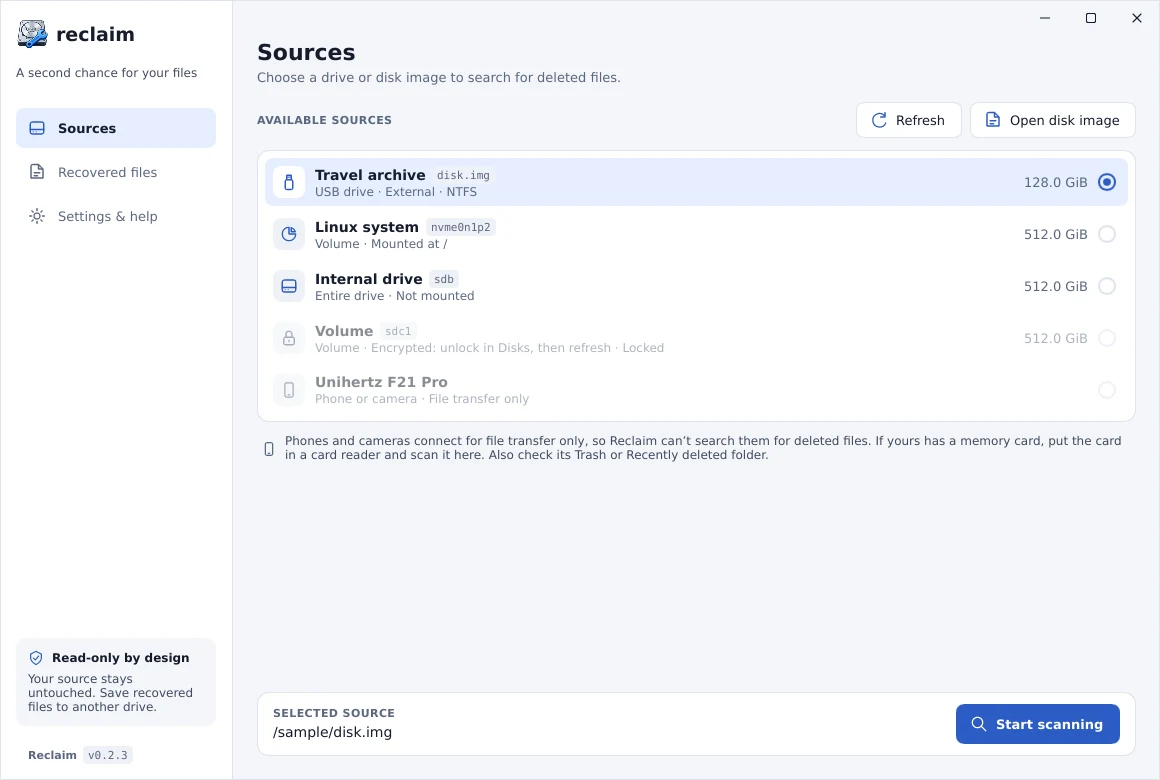
Four steps from “oh no” to “got it”.
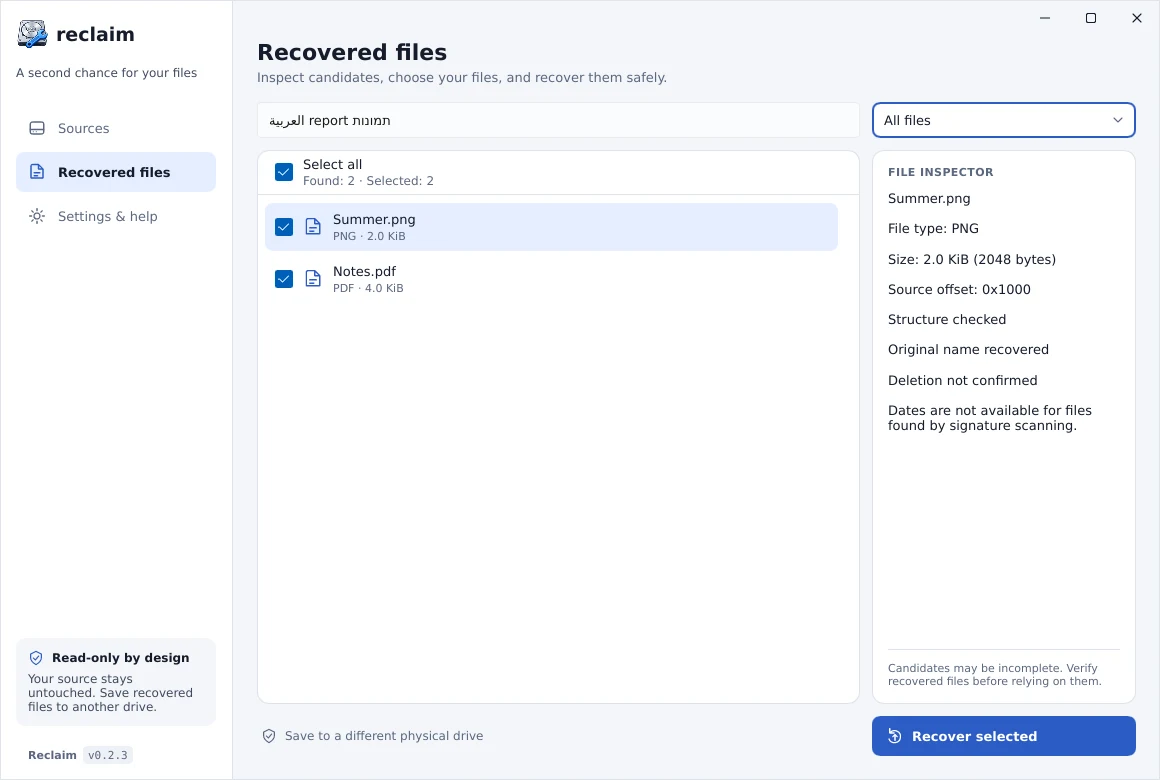
Simple on the surface. Cautious underneath.
-
Read-only by design
Reclaim never writes to the drive it scans. It reads the file system’s allocation map and only searches free space, so existing files are left alone.
-
See before you save
File-type icons, search, category filters, image previews and a file inspector help you sort real finds from noise.
-
Works with common drives
NTFS, FAT12/16/32, exFAT, ext2/3/4 and HFS+: the formats used by Windows and Linux drives, Mac external drives, USB sticks, SD cards and camera memory cards.
-
In your language
English, Hebrew, Arabic, Spanish, French, German and Russian, with right-to-left layouts and light and dark themes.
-
Safe updates
Reclaim checks for new versions and verifies every update’s signature and checksum before installing. No scan data ever leaves your computer.
-
Free and open source
No trial limits, no account, no upsell. The full source code is on GitHub under the MIT licence.
The files people lose most.
Reclaim recognises files by their content, so they can be found even when their name is gone.
- Photos and images
- JPEG, PNG, GIF, BMP, WebP, QOI, ICO
- Documents and ebooks
- PDF, Word, Excel, PowerPoint, OpenDocument, EPUB
- Archives
- ZIP, 7z, RAR5, CAB, TAR, GZIP, XAR, JAR, APK
- Programs and installers
- EXE, DLL, ELF, MSI, DEB, RPM, DEX, PKG
- Audio and video
- WAV, AIFF, AU, MIDI, AVI, Ogg Vorbis, Opus, Theora, Flash (SWF)
- Databases
- SQLite
What Reclaim can’t do (yet).
Reclaim is an early preview and recovery is never guaranteed. You should know the limits before you start.
- Overwritten data, or data erased by an SSD’s TRIM, cannot be brought back.
- Original file names and folders are not restored; files get generated names.
- Most files are limited to 64 MiB, and fragmented files may come back incomplete.
- Mac built-in drives (APFS), Linux partitions using Btrfs or XFS, and whole-disk images with partition tables can’t be scanned yet.
- Scan results are not kept after you quit, so save what you need first.
Questions
Is Reclaim really free?
Yes. Reclaim is free and open source under the MIT licence. There are no paid tiers, recovery limits or accounts.
Can I recover files after emptying the Recycle Bin or Trash?
If the files are still in the Recycle Bin or Trash, restore them from there: it’s faster and keeps their names. After emptying it, files on hard drives, memory cards and USB sticks usually stay on the disk until something overwrites them, so a scan has a good chance. On a computer’s internal SSD they are often erased soon after (see the SSD question below).
Can it recover photos from an SD card or USB stick?
Usually, yes: SD cards and most USB sticks use FAT32 or exFAT, which Reclaim supports. Stop using the card right away, don’t take new photos with it, and decline any offer to format it. Then connect it with a card reader, choose it in Reclaim and start a scan.
Will scanning change or damage my drive?
No. Reclaim only reads the drive it scans. Save recovered files to a different drive: saving them to the same one could overwrite files you haven’t recovered yet.
Does it work on SSDs?
Internal SSDs usually don’t keep deleted files for long. The system tells the SSD which space is free (this is called TRIM) and the SSD erases it. On Windows and Mac this usually happens right after deletion; on Linux it often waits for a weekly cleanup. Once trimmed, no software can bring the data back. USB sticks and many older external drives don’t receive TRIM, so chances there are better, but modern external SSDs often do.
What if the drive is clicking, very slow or keeps disconnecting?
Stop using it and don’t scan it. A failing drive can get worse with every read, and recovery software can’t fix hardware. If the data matters, turn the drive off and contact a professional data recovery service.
Why do recovered files have different names?
Reclaim finds files by their contents in free space, where the original name and folder are usually no longer recorded. Files are saved with generated names, so open them to check what they are.
The sooner you scan, the better your chances.
Reclaim is free, and the installer is under 10 MB.